【 HTML5, iPhone 】 写真を使ったボックスレイアウト
html5を使った、iPhone(スマホ)サイトを紹介します。
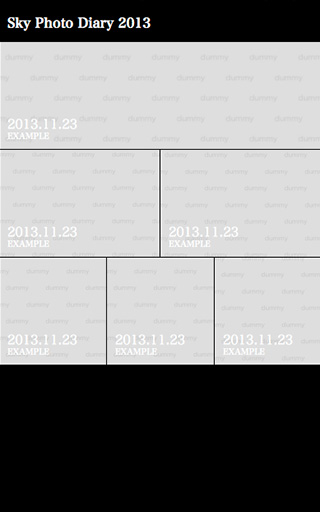
このサイトは写真を使ったボックスレイアウトでできています。
写真を変えるだけでもオシャレで使いやすいサイトになるので是非試してみてみて下さい。
【index.html】
<!DOCTYPE html>
<html lang="ja">
<head>
<meta charset="UTF-8">
<meta name="viewport" content="width=device-width, initial-scale=1, maximum-scale=1">
<link rel="stylesheet" href="css/reset.css" media="all">
<link rel="stylesheet" href="css/style.css" media="all">
<title>写真を使ったボックスレイアウト</title>
</head>
<body>
<header>
<h1>Sky Photo Diary 2013</h1>
</header>

<article>
<div>
<section class="img01"><a href="#"><p>2013.11.23</p><h1>EXAMPLE</h1></a></section>
</div>

<div>
<section class="img02"><a href="#"><p>2013.11.23</p><h1>EXAMPLE</h1></a></section>
<section class="img03"><a href="#"><p>2013.11.23</p><h1>EXAMPLE</h1></a></section>
</div>

<div>
<section class="img04"><a href="#"><p>2013.11.23</p><h1>EXAMPLE</h1></a></section>
<section class="img05"><a href="#"><p>2013.11.23</p><h1>EXAMPLE</h1></a></section>
<section class="img06"><a href="#"><p>2013.11.23</p><h1>EXAMPLE</h1></a></section>
</div>

</article>

</body>
</html>
【reset.css】
/*
html5doctor.com Reset Stylesheet
v1.6.1
Last Updated: 2010-09-17
Author: Richard Clark - http://richclarkdesign.com
Twitter: @rich_clark
*/

html, body, div, span, object, iframe,
h1, h2, h3, h4, h5, h6, p, blockquote, pre,
abbr, address, cite, code,
del, dfn, em, img, ins, kbd, q, samp,
small, strong, sub, sup, var,
b, i,
dl, dt, dd, ol, ul, li,
fieldset, form, label, legend,
table, caption, tbody, tfoot, thead, tr, th, td,
article, aside, canvas, details, figcaption, figure,
footer, header, hgroup, menu, nav, section, summary,
time, mark, audio, video {
    margin:0;
    padding:0;
    border:0;
    outline:0;
    font-size:100%;
    vertical-align:baseline;
    background:transparent;
}

body {
    line-height:1;
}

article,aside,details,figcaption,figure,
footer,header,hgroup,menu,nav,section {
    display:block;
}

nav ul {
    list-style:none;
}

blockquote, q {
    quotes:none;
}

blockquote:before, blockquote:after,
q:before, q:after {
    content:'';
    content:none;
}

a {
    margin:0;
    padding:0;
    font-size:100%;
    vertical-align:baseline;
    background:transparent;
}

/* change colours to suit your needs */
ins {
    background-color:#ff9;
    color:#000;
    text-decoration:none;
}

/* change colours to suit your needs */
mark {
    background-color:#ff9;
    color:#000;
    font-style:italic;
    font-weight:bold;
}

del {
    text-decoration: line-through;
}

abbr[title], dfn[title] {
    border-bottom:1px dotted;
    cursor:help;
}

table {
    border-collapse:collapse;
    border-spacing:0;
}

/* change border colour to suit your needs */
hr {
    display:block;
    height:1px;
    border:0;
    border-top:1px solid #cccccc;
    margin:1em 0;
    padding:0;
}

input, select {
    vertical-align:middle;
}【style.css】
@charset "UTF-8";

/* Layout */
body {
font-family: serif;
color: #FFF;
background: #000;
}

header {
margin: 20px 10px 15px 10px;
}

article {
font-size: 0;
}

article div {
width: 100%;
display: -webkit-box;
display: -moz-box;
display: box;
margin: 0 0 1px 0;
}

article div section {
position: relative;
display: flex;
width: auto;
height: 130px;
-webkit-box-flex: 1;
-moz-box-flex: 1;
box-flex: 1;
border-right: #000 solid 1px;
}

article div section.img01 {
background: url(../img/img01.jpg) no-repeat center top;
background-size: cover;
-webkit-background-size: cover;
}

article div section.img02{
background: url(../img/img02.jpg) no-repeat center top;
background-size: cover;
-webkit-background-size: cover;
}

article div section.img03 {
background: url(../img/img03.jpg) no-repeat center top;
background-size: cover;
-webkit-background-size: cover;
}

article div section.img04{
background: url(../img/img04.jpg) no-repeat center top;
background-size: cover;
-webkit-background-size: cover;
}

article div section.img05 {
background: url(../img/img05.jpg) no-repeat center top;
background-size: cover;
-webkit-background-size: cover;
}

article div section.img06 {
background: url(../img/img06.jpg) no-repeat center top;
background-size: cover;
-webkit-background-size: cover;
}

article div section: last-child {
border-right: none;
}

article div section a {
display: block;
position: absolute;
left: 0;
top: 0;
width: 100%;
height: 100%;
color: #FFF;
text-decoration: none;
}

article div section a p
position: absolute;
left: 10px;
bottom: 22px;
font-size: 16px;
}

article div section a h1 {
position: absolute;
left: 10px;
bottom: 10px;
font-size: 10px;
}
【 修正とSEO対策 】 タヒチのコーディネーター・エコプロジェクト|enzo planning
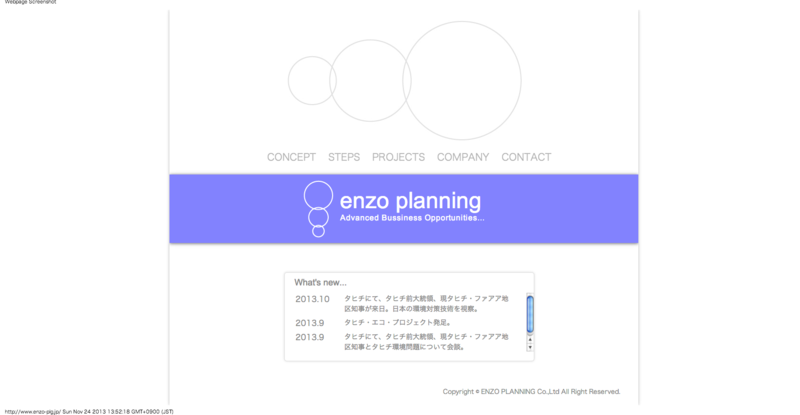
【 修正とSEO対策 】タヒチのコーディネーター・エコプロジェクト|enzo planning の企業サイトを編集、SEO対策を行いました。
【meta content】
タヒチのコーディネーター、メディア向け専用、タヒチ・コーディネート業務を開始。タヒチのコーディネーター・エコプロジェクトをはじめ、人と地球が必要とする未来を創造する企業であるenzo planning【 圓蔵プランニング 】です。タヒチの黒真珠養殖業者と提携することで、製品の販売や卸業務を展開しており、オリジナルブランド「 POEMATA ( 真珠の瞳 ) 」の展開を予定しています。
今回のキーワード設定は、タヒチ、コーディネーター、エコにしました。
そのため、meta contentでは、タヒチのコーディネーターという言葉を繰り返し使い、titleにも同じように重複させるようにしています。
実際にはh1にも繰り返しキーワードを入れる方がいいのですが、デザイン上h1には入れていません。
以前はキーワードに企業名を入れていましたが、googleにインデックス済みなので今回は省きました。
キーワードは多ければいいものではなく、多いほど各キーワードに対する重要さが小さくなってしまうので、3つに絞るのがベストでしょう。
もしよろしければ参考にしてみてください。
www.enzo-plg.jp - レンタルサーバー動作状況
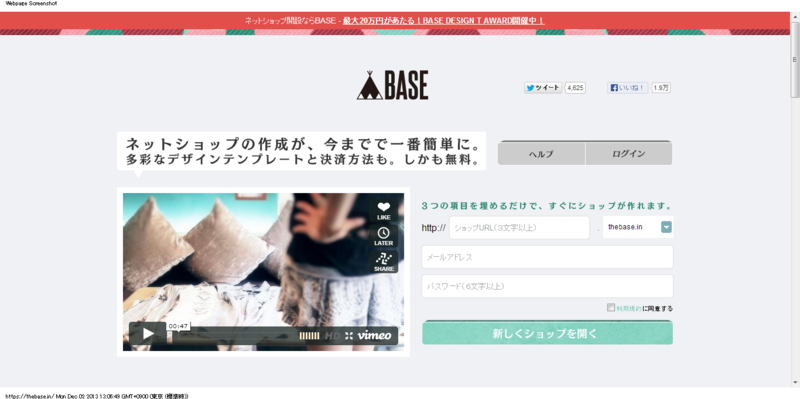
【ECサイト】 BASE 無料で利用できるショッピングカート
ECサイトを作る際、BASEという無料で利用できるショッピングカートを紹介します。
BASAは無料で利用できるショッピングカートで、決済方法も、クレジットカード、代引き、銀行振り込みと選べます。
さらにテーマやヘッダー画像、背景もカスタマイズできるのでかなり自由度が高いです。
個人でお店をやってる人にはかなりおすすめです!
【 HTML5, iPhone 】 写真を使ったボックスレイアウト
html5を使った、iPhone(スマホ)サイトを紹介します。
このサイトは写真を使ったボックスレイアウトでできています。
写真を変えるだけでもオシャレで使いやすいサイトになるので是非試してみてみて下さい。
【index.html】
<!DOCTYPE html>
<html lang="ja">
<head>
<meta charset="UTF-8">
<meta name="viewport" content="width=device-width, initial-scale=1, maximum-scale=1">
<link rel="stylesheet" href="css/reset.css" media="all">
<link rel="stylesheet" href="css/style.css" media="all">
<title>写真を使ったボックスレイアウト</title>
</head>
<body>
<header>
<h1>Sky Photo Diary 2013</h1>
</header>

<article>
<div>
<section class="img01"><a href="#"><p>2013.11.23</p><h1>EXAMPLE</h1></a></section>
</div>

<div>
<section class="img02"><a href="#"><p>2013.11.23</p><h1>EXAMPLE</h1></a></section>
<section class="img03"><a href="#"><p>2013.11.23</p><h1>EXAMPLE</h1></a></section>
</div>

<div>
<section class="img04"><a href="#"><p>2013.11.23</p><h1>EXAMPLE</h1></a></section>
<section class="img05"><a href="#"><p>2013.11.23</p><h1>EXAMPLE</h1></a></section>
<section class="img06"><a href="#"><p>2013.11.23</p><h1>EXAMPLE</h1></a></section>
</div>

</article>

</body>
</html>
【reset.css】
/*
html5doctor.com Reset Stylesheet
v1.6.1
Last Updated: 2010-09-17
Author: Richard Clark - http://richclarkdesign.com
Twitter: @rich_clark
*/

html, body, div, span, object, iframe,
h1, h2, h3, h4, h5, h6, p, blockquote, pre,
abbr, address, cite, code,
del, dfn, em, img, ins, kbd, q, samp,
small, strong, sub, sup, var,
b, i,
dl, dt, dd, ol, ul, li,
fieldset, form, label, legend,
table, caption, tbody, tfoot, thead, tr, th, td,
article, aside, canvas, details, figcaption, figure,
footer, header, hgroup, menu, nav, section, summary,
time, mark, audio, video {
    margin:0;
    padding:0;
    border:0;
    outline:0;
    font-size:100%;
    vertical-align:baseline;
    background:transparent;
}

body {
    line-height:1;
}

article,aside,details,figcaption,figure,
footer,header,hgroup,menu,nav,section {
    display:block;
}

nav ul {
    list-style:none;
}

blockquote, q {
    quotes:none;
}

blockquote:before, blockquote:after,
q:before, q:after {
    content:'';
    content:none;
}

a {
    margin:0;
    padding:0;
    font-size:100%;
    vertical-align:baseline;
    background:transparent;
}

/* change colours to suit your needs */
ins {
    background-color:#ff9;
    color:#000;
    text-decoration:none;
}

/* change colours to suit your needs */
mark {
    background-color:#ff9;
    color:#000;
    font-style:italic;
    font-weight:bold;
}

del {
    text-decoration: line-through;
}

abbr[title], dfn[title] {
    border-bottom:1px dotted;
    cursor:help;
}

table {
    border-collapse:collapse;
    border-spacing:0;
}

/* change border colour to suit your needs */
hr {
    display:block;
    height:1px;
    border:0;
    border-top:1px solid #cccccc;
    margin:1em 0;
    padding:0;
}

input, select {
    vertical-align:middle;
}【style.css】
@charset "UTF-8";

/* Layout */
body {
font-family: serif;
color: #FFF;
background: #000;
}

header {
margin: 20px 10px 15px 10px;
}

article {
font-size: 0;
}

article div {
width: 100%;
display: -webkit-box;
display: -moz-box;
display: box;
margin: 0 0 1px 0;
}

article div section {
position: relative;
display: flex;
width: auto;
height: 130px;
-webkit-box-flex: 1;
-moz-box-flex: 1;
box-flex: 1;
border-right: #000 solid 1px;
}

article div section.img01 {
background: url(../img/img01.jpg) no-repeat center top;
background-size: cover;
-webkit-background-size: cover;
}

article div section.img02{
background: url(../img/img02.jpg) no-repeat center top;
background-size: cover;
-webkit-background-size: cover;
}

article div section.img03 {
background: url(../img/img03.jpg) no-repeat center top;
background-size: cover;
-webkit-background-size: cover;
}

article div section.img04{
background: url(../img/img04.jpg) no-repeat center top;
background-size: cover;
-webkit-background-size: cover;
}

article div section.img05 {
background: url(../img/img05.jpg) no-repeat center top;
background-size: cover;
-webkit-background-size: cover;
}

article div section.img06 {
background: url(../img/img06.jpg) no-repeat center top;
background-size: cover;
-webkit-background-size: cover;
}

article div section: last-child {
border-right: none;
}

article div section a {
display: block;
position: absolute;
left: 0;
top: 0;
width: 100%;
height: 100%;
color: #FFF;
text-decoration: none;
}

article div section a p
position: absolute;
left: 10px;
bottom: 22px;
font-size: 16px;
}

article div section a h1 {
position: absolute;
left: 10px;
bottom: 10px;
font-size: 10px;
}
【 修正とSEO対策 】 タヒチのコーディネーター・エコプロジェクト
【 修正とSEO対策 】タヒチのコーディネーター・エコプロジェクト|enzo planning の企業サイトを編集、SEO対策を行いました。
【meta content】
タヒチのコーディネーター、メディア向け専用、タヒチ・コーディネート業務を開始。タヒチのコーディネーター・エコプロジェクトをはじめ、人と地球が必要とする未来を創造する企業であるenzo planning【 圓蔵プランニング 】です。タヒチの黒真珠養殖業者と提携することで、製品の販売や卸業務を展開しており、オリジナルブランド「 POEMATA ( 真珠の瞳 ) 」の展開を予定しています。
今回のキーワード設定は、タヒチ、コーディネーター、エコにしました。
そのため、meta contentでは、タヒチのコーディネーターという言葉を繰り返し使い、titleにも同じように重複させるようにしています。
実際にはh1にも繰り返しキーワードを入れる方がいいのですが、デザイン上h1には入れていません。
以前はキーワードに企業名を入れていましたが、googleにインデックス済みなので今回は省きました。
キーワードは多ければいいものではなく、多いほど各キーワードに対する重要さが小さくなってしまうので、3つに絞るのがベストでしょう。
もしよろしければ参考にしてみてください。
www.enzo-plg.jp - レンタルサーバー動作状況
